Posts

Showing posts with the label arduino

Robo Race / Robo Soccer

 This code Below is the Perfect Code for controlling Arduino Bots. REMEMBER : if you know how to do connections then this code is an elixir for you because unlike previous posts i have provided circuit diagram for connections, but this time this code is prepared by me and i made connections through understanding of code itself.  Enjoy!! **-----new code starts here, the 4 motor code smooth working-----** int m1a = 9;  // Motor 1, Pin A int m1b = 10; // Motor 1, Pin B int m2a = 11; // Motor 2, Pin A int m2b = 12; // Motor 2, Pin B char val; void setup() {   pinMode(m1a, OUTPUT);   pinMode(m1b, OUTPUT);   pinMode(m2a, OUTPUT);   pinMode(m2b, OUTPUT);   Serial.begin(9600); } void loop() {   while (Serial.available() > 0) {     val = Serial.read();     Serial.println(val);   }   if (val == 'F') { // Forward     digitalWrite(m1a, HIGH);     digitalWrite(m1b, LOW);     digitalWrite(m2a, ...
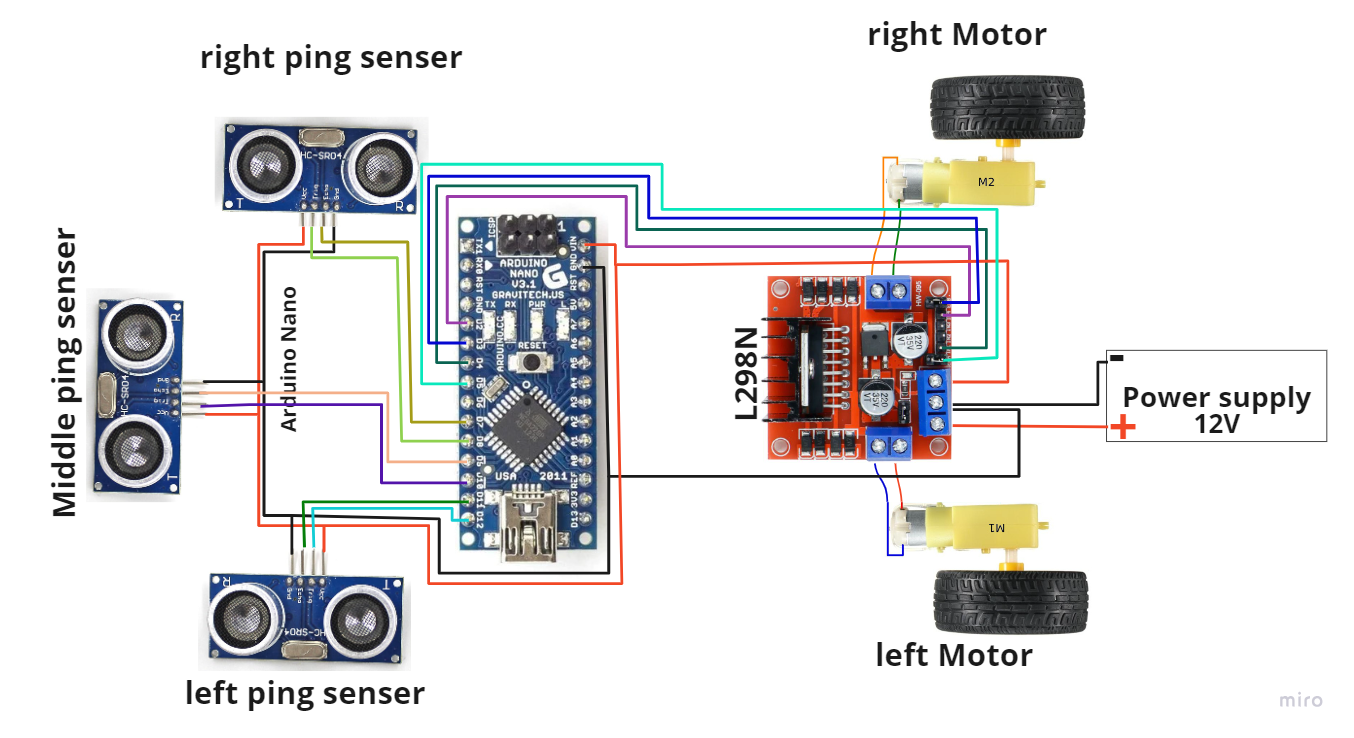
Obstacle Avoiding Bot ( Maze Solver )

Image
 This is the Obstacle Avoiding /  Maze Solver Bot Code & Circuit Diagrams  Main Components Required  1 . Arduino UNO / UNO R3 - 01 2 .  L298 Motor Driver - 01 3 . N20 300rpm Motor - 04 4 . Caster wheel - 04 5 . Ultrasonic Senser - 03 6 . Some Jumper Wires 7 . 12V Battery **---------------code starts here---------------** // Pin definitions for motors and ultrasonic sensors const int leftMotorPin = 2; const int rightMotorPin = 4; const int frontUltrasonicTrigPin = 11; const int frontUltrasonicEchoPin = 12; const int leftUltrasonicTrigPin = 9;  const int leftUltrasonicEchoPin = 10; const int rightUltrasonicTrigPin = 7; const int rightUltrasonicEchoPin = 8; const int motorPinA = 3; const int motorPinB = 5; // Maximum distance to consider an obstacle (in centimeters) const int obstacleDistance = 15; void setup() {   // Initialize motor pins as outputs   pinMode(leftMotorPin, OUTPUT);   pinMode(rightMotorPin, OUTPUT);   pinMode(motorPinA,...

Line Follower Bot

Image
This is the Line Follower Arduino Bot Code Using IR Sensors REMEMBER : This code only detects black line with 96% Accuracy and can with achived completly upon the tuning of the IR Sensors based on the bot capability. **-------------the code starts here --------------** #define IR_SENSOR_RIGHT 11 #define IR_SENSOR_LEFT 12 #define MOTOR_SPEED 180 //Right motor int enableRightMotor=6; int rightMotorPin1=7; int rightMotorPin2=8; //Left motor int enableLeftMotor=5; int leftMotorPin1=9; int leftMotorPin2=10; void setup() {   TCCR0B = TCCR0B & B11111000 | B00000010 ;      // put your setup code here, to run once:   pinMode(enableRightMotor, OUTPUT);   pinMode(rightMotorPin1, OUTPUT);   pinMode(rightMotorPin2, OUTPUT);      pinMode(enableLeftMotor, OUTPUT);   pinMode(leftMotorPin1, OUTPUT);   pinMode(leftMotorPin2, OUTPUT);   pinMode(IR_SENSOR_RIGHT, INPUT);   pinMode(IR_SENSOR_LEFT, INPUT);   rotateMotor(0,0);...